
Peanut Square SAS Logo
Free ToolsPricingAbout UsContact
+91 94296 94521Schedule Demo
SASKnowledgeCRMHow to organize and schedule activities
Documentation
•Hub
Reporting
  • How to Manage Reporting in CRM
CRM Configuration
  • How to Set Up Predictive Lead Scoring
  • How to Use Rule-Based Assignment
  • How to Manage Multi Teams in CRM
  • How to Add a New Lost Reasons
  • How to Create Tags
  • How to Set Up Recurring plans
  • How to Manage Customer Records
  • How to Add and Manage Sales Team in CRM
Lead Management
  • How to customize Visits to Leads settings for better conversion
  • How to Create a Quotation in CRM
  • How to Create a New Opportunity from a Lead
  • What is Lead Management
Activity Management
  • How to Set Activity Types
  • How to organize and schedule activities
  • How to Manage and Monitor Activities
Manage CRM
  • How to Manage CRM
CRMCRM
Activity Management
1 min read

How to organize and schedule activities

Planning your business-related duties in a systematic approach allows you to micromanage and use time more effectively. In the Pipeline window, you may organize events with your clients or schedule and carry out certain tasks for them. Go to the Sales tab and choose “My Pipeline” to utilize this option.
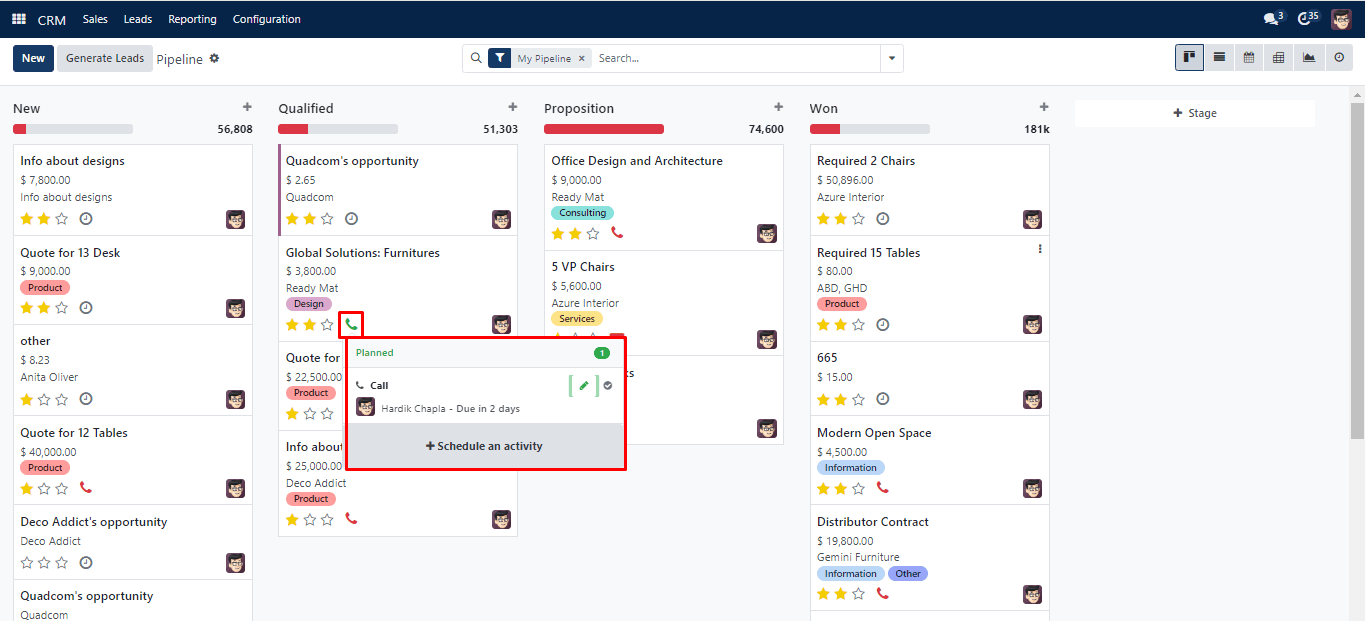
Clock Symbol Pop-Up

If no events are scheduled for the record, the clock symbol, as seen above, will appear in its Kanban view. Depending on what kind of event it symbolizes, it will take on the form of a phone, email, etc. Clicking on the corresponding icon will open the dialogue box displayed above. After that, select “Schedule an Activity.” You’ll see the pop-up window that follows.
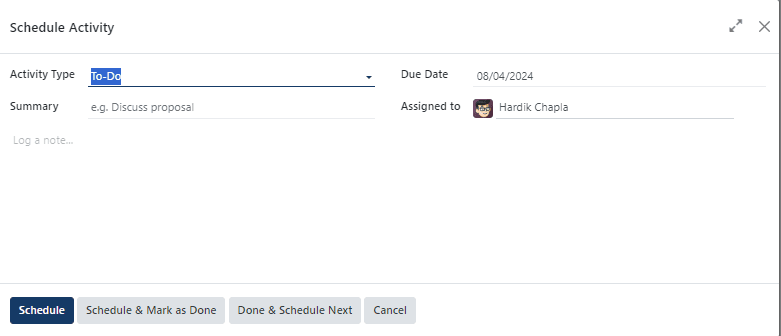
To Do

This window displays the fields Assigned to, Due Date, and Activity Type. To “Log a note,” you may optionally write a description. After entering your information, select “Schedule.”

Was this guide helpful?
Your feedback helps us continuously improve our SAS playbooks.
Previous Article
How to Set Activity Types
Next Article
How to Manage and Monitor Activities

Need help configuring your SAS modules?

Speak with a Peanut Square SAS solution architect to assist with custom onboarding and team trainings.

Schedule ConsultationKnowledge Hub
Peanut Square SAS Logo

Join us at Peanut Square LLP and watch your business soaring to new heights with our state-of-the-art technology based IT solutions.

Certified ISO 9001:2015 Company
Certified ISO 27001:2022 Company

Need Help ?

  • Apps
  • Industries
  • Resources
  • Free Tools
  • About Us
  • Contact
  • Privacy Policy
  • Terms and Conditions
  • Cancellation and Refund Policy

Partners

  • viaSocket

Contact Information

C-306 Signature-2, Nr. Sarkhej-Sanand Cross Road, Sarkhej, Ahmedabad, Gujarat-382210
sas.sales@peanutsquare.com

© 2026 Peanut Square LLP. All Rights Reserved.