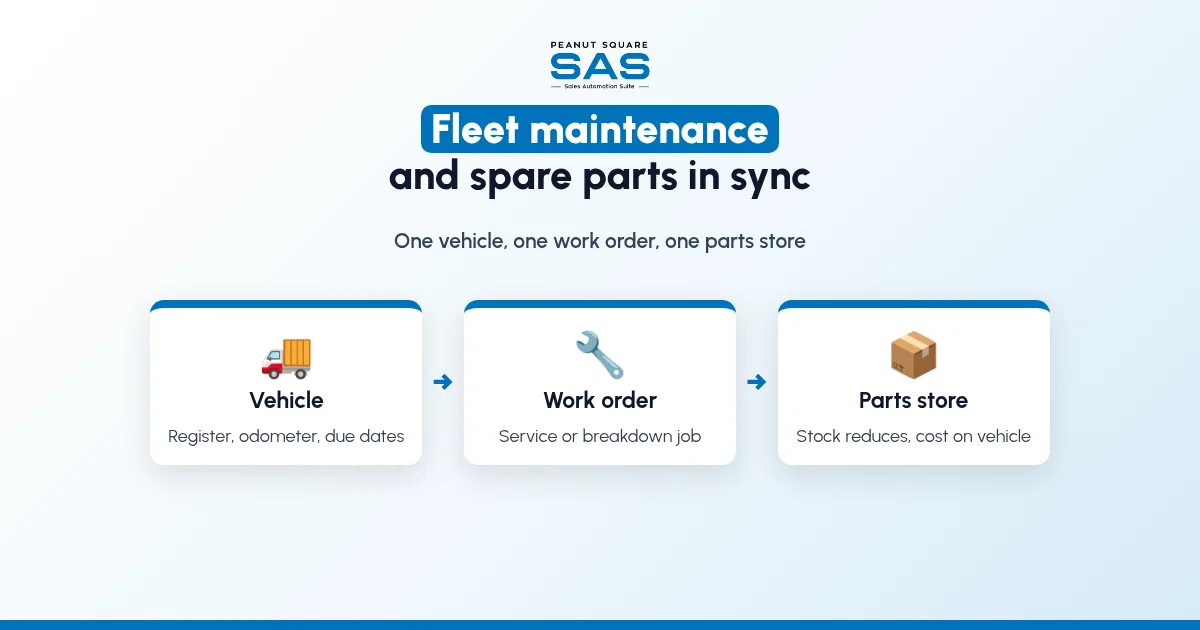
Short answer: Here is how to sync fleet maintenance with inventory system records: keep one vehicle register, and raise every service, breakdown and tyre job as a work order on the vehicle. Each part fitted should be issued from a spare-parts store, so stock reduces and the cost lands on that vehicle. Schedule service by date or kilometres, and let minimum stock levels reorder fast-moving parts.
This guide is for owners and transport managers in India who run their own trucks, tempos, delivery vans, buses, cars or forklifts, and for workshops that maintain them. It covers why vehicle service and spare parts drift apart, what "in sync" should mean, a seven-step setup, a monthly review, what to check when you compare software, and what Sales Automation Suite documents today. If you also sell from the same godown, read our guide to inventory and sales integration first.
Why do fleet maintenance and spare parts stock drift apart?
Most fleets start with a service diary or a spreadsheet for each vehicle, a parts cupboard managed by the senior mechanic, and bills that reach the accountant at month end. Each piece works on its own. Together, they leave gaps:
Parts leave the store without a vehicle number. A filter or a set of brake pads is taken for "the truck", so stock reduces but no vehicle carries the cost.
Two names for one part. The mechanic calls it by the old part number, the stores register by the supplier's name, and the count never matches.
Service is due by memory. Oil changes, tyre rotation, insurance, fitness and permit dates sit in different notebooks, so a vehicle runs past its service or its papers.
Outside garage bills are not split. A workshop bill with parts and labour is paid as one amount, so you cannot see which part failed again.
Emergency buying. The part is not in stock when the vehicle breaks down, so someone buys it locally at whatever price is quoted.
No cost per vehicle. Fuel, parts, labour and tyres are paid from different heads, so the owner cannot tell which vehicle is costing more to run than it earns.
The cost does not show on the day. It shows as vehicles off the road waiting for parts, a parts store that never counts right and a repair bill nobody can explain.
What does "fleet maintenance in sync with inventory" mean?
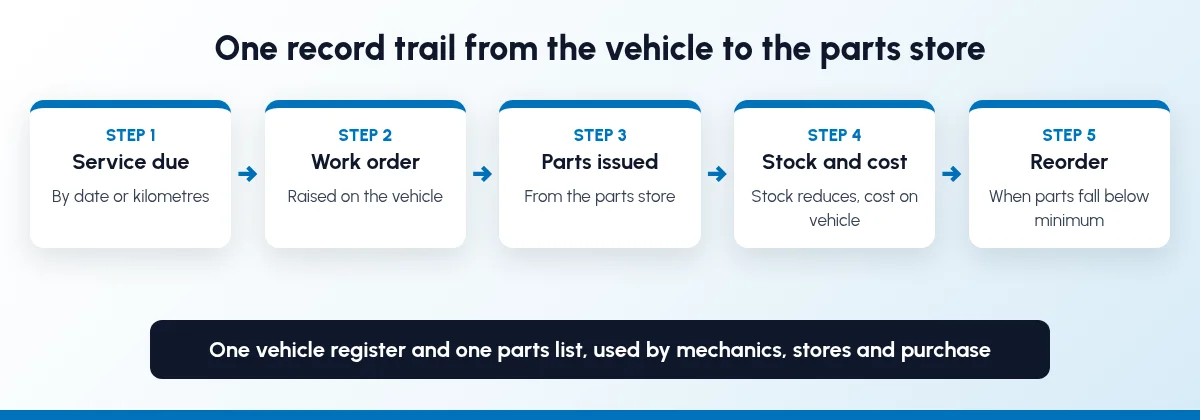
It means one record trail from the vehicle to the parts store and the books:
One vehicle register. Each vehicle has one record: number, model, driver, odometer, documents and their due dates.
One parts list. Each spare part has one code, one unit and the vehicle models it fits, used by mechanics, stores and purchase.
Every job is a work order. Planned service, breakdowns, tyre changes and body work are raised against a vehicle, never only in a diary.
Parts issued against the job. Parts fitted are issued from the store to the work order, so stock reduces and the cost sits on that vehicle.
Reorder from real stock. Minimum levels on fast-moving parts trigger a purchase before the shelf is empty.
Cost per vehicle. Parts, labour, outside garage bills and fuel add up on the vehicle, so you can compare vehicles month by month.
If the same godown also holds goods you sell or use in production, keep spare parts in their own store or location, so a sales order never reserves the last set of brake pads.
How to sync fleet maintenance with inventory system, step by step
Move in the order the work flows. Each step is useful on its own, so settle in before the next.
Step 1: Build the vehicle register
List every vehicle with its registration number, model, year, assigned driver and current odometer reading. Add the due dates you already track on paper: insurance, PUC, fitness certificate, permit and road tax. Attach scans of the documents to the vehicle, so nobody searches a cupboard when a checkpost asks for them.
Step 2: Clean up the spare parts list
Give each part one code, one unit of measure and one name, and note which vehicle models it fits. Group parts into families such as filters, oils, brakes, tyres, batteries, belts and electricals. Count what is actually in the parts store and enter it as opening stock. Every later step depends on that number being right.
Step 3: Set up a parts store
Keep spare parts in a separate store or location from finished goods and raw material. If you run more than one depot, give each depot its own parts store, so a mechanic in one city can see whether a part is lying in another before anyone buys it.
Step 4: Set service plans by date or kilometres
For each vehicle model, write down what is serviced and when: engine oil and filters every so many kilometres or months, whichever comes first, tyre rotation, brake checks and battery checks. Follow the vehicle maker's service schedule. Drivers or supervisors should record the odometer at fuel stops or at the start of each week, so the next service is due on real kilometres, not guesses.
Step 5: Raise a work order for every job
Every service, breakdown or tyre change gets a work order on the vehicle with the date, odometer reading, complaint, mechanic and status. When the work goes to an outside garage, record the garage, the parts list and the labour separately, even if you pay one bill.
Step 6: Issue parts to the work order, not to "the truck"
The stores keeper issues parts against the work order number, and returns unused parts to stock against the same number. Old parts that can be refurbished or sold as scrap go back into a separate location, not the bin. This one habit is what makes stock and the vehicle's history agree.
Step 7: Let low stock trigger a reorder
Set minimum and maximum levels for parts you use every month, such as oil, filters and brake pads. When stock falls below the minimum, the system should suggest or create a purchase order, so a breakdown is not followed by a day of local buying. Review slow-moving parts once a quarter, because parts for a vehicle you have already sold are cash on a shelf.
What should a monthly fleet maintenance review check?
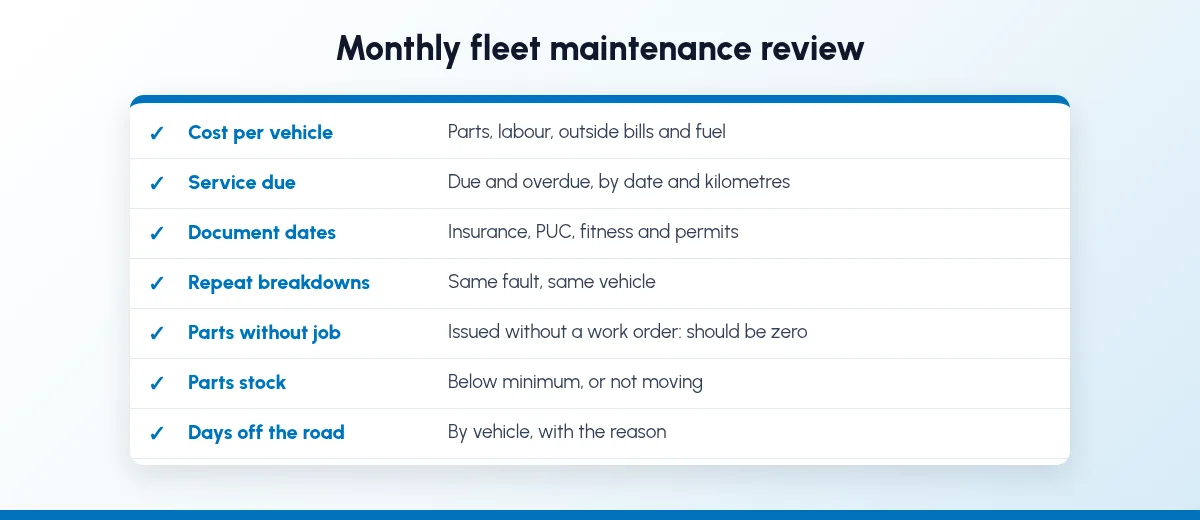
A short review every month catches problems while there is still time to act:
Cost per vehicle, split into parts, labour, outside garage bills and fuel, against the previous month.
Service due and overdue, by vehicle, by date and by kilometres.
Document due dates for insurance, PUC, fitness and permits in the next month.
Repeat breakdowns, the same fault on the same vehicle more than once.
Parts issued without a work order, which should be zero.
Parts below minimum and parts that have not moved in months.
Days off the road, by vehicle, with the reason: waiting for parts, waiting for a mechanic or waiting for approval.
If you still run this review in spreadsheets, our guide to moving sales management off Excel sheets shows how to make the switch without losing history.
Is it different for transporters, distributors and workshops?
The routine is the same, and the emphasis changes:
Transporters and logistics fleets: kilometres are high and downtime is lost revenue, so service by kilometres, tyre records by position and parts stock at each depot matter most.
Distributors and manufacturers with delivery vehicles: the fleet supports sales, so vehicle cost should sit next to the routes and orders it serves, and parts should not share shelves with saleable stock.
Schools and staff bus operators: fitness, permit and insurance dates and driver records carry the most risk, so document reminders come first.
Car service and repair workshops: you maintain other people's vehicles, so each job card needs the customer, the parts used from your stock and the bill. The SAS automobile service page describes SAS Car Repairing and Servicing for repair and service jobs, and SAS WhatsApp Car Repair Services for customer notifications on WhatsApp.
What should you check in fleet maintenance and inventory software?
Ask for a live demo on your own vehicles and your own parts, not a slide. These questions separate one connected system from a fleet app with an export button:
One parts list: do maintenance, stores, purchase and accounts use the same part codes, units and prices?
Parts issue: when a mechanic fits a part, does it reduce stock in the right store and add its cost to that vehicle, from the same entry?
Service due: can service be planned by date and by odometer reading, and who gets the reminder?
Documents: does the vehicle record hold insurance, PUC, fitness and permit dates, with reminders before they lapse?
Outside garages: can you record an outside bill with parts and labour split, against the vehicle?
Cost per vehicle: does a report show parts, labour, fuel and other costs by vehicle and by month, without exporting to Excel?
Reorder: do minimum levels on parts create a purchase suggestion or order?
Mobile entry: can a driver or mechanic record odometer readings, fuel and job status from a phone?
Users and cost: how are drivers and mechanics licensed, and are fleet and maintenance in the plan price or quoted separately?
Ask the vendor to show each answer on screen and to put anything not shown into the written quote. Our ERP and CRM buyer's checklist lists the wider questions to ask before you sign, and if you are deciding between a CRM and a full ERP, read our comparison of ERP vs CRM for manufacturers.
How does Sales Automation Suite handle fleet maintenance and inventory?
SAS lists Fleet, Maintenance, Repair, Inventory and Purchase as apps in one suite. Here is what the live SAS pages show today, and what they leave open.
Sales Automation Suite (SAS) from Peanut Square is one ERP and CRM built for how India sells. It is meant for India B2B sellers who outgrow a CRM-only stack and want one INR-priced ERP+CRM with India lead portals and WhatsApp on the pricing page, on Cloud or On-Premise. Peanut Square is based in Ahmedabad and holds ISO 9001:2015 and ISO 27001:2022 certification.
What the SAS app and help pages describe:
Fleet: the SAS Fleet app page describes vehicle details, contracts, maintenance records, costs and driver data in one place, fuel logs, reminders for contract expiry dates, and cost analysis by vehicle and service type, covering leasing, service contracts, fuel and repairs. Its feature list names Vehicle Management, Fleet Maintenance Management, Expense Management and Fleet Scheduling and Usage.
Maintenance: the SAS Maintenance app page describes maintenance requests on kanban and calendar views, automated scheduling for preventive maintenance, MTBF and MTBR calculations, work orders, equipment and asset management and maintenance cost tracking.
Repair: the SAS Repair app page describes tracking repair requests, assigning tasks and checking repair orders. The repair order screen on that page shows a Parts tab on each order (demo data).
Inventory and reorders: the SAS Inventory help guide says the Inventory module works with Sales, Point of Sale, Purchase, Accounting, Manufacturing and Repairing. The SAS replenishment guide describes minimum and maximum quantities per product, with on-hand and forecast figures and manual or automatic reorders.
Workshop parts: the SAS automobile service page lists SAS Stock Quantity Alert for parts with variants, barcode and stock tracking, with an email alert when stock runs low.
Plan features: the SAS pricing page lists Multiple Stores, Min levels, Purchase Planning, Purchase Orders, GRN, Material Issue and Stock Reconciliation under Inventory, and Mobile Access & Entry, alongside Accounting.
The SAS pages we checked don't settle every fleet question. They don't say whether a fleet service entry issues spare parts from Inventory, whether service can be planned on odometer readings, or how vehicle document dates are reminded. Ask the SAS team to run one of your vehicles, from a service due to the parts issue and the cost report, in a demo, and to put each answer in the written quote.
On price: ₹300/user/month on Premium (40% off ₹500, GST extra, billed yearly).
If service records, parts and purchase each sit in a separate tool today, you may also recognise the signs your business has outgrown a CRM-only tool.
To see it with your own vehicles and parts: Book a free demo at sas.peanutsquare.com
How do I sync fleet maintenance with my inventory system?
Keep one vehicle register and one spare parts list in the same system. Raise every service or breakdown as a work order on the vehicle, issue parts from a parts store against that work order, and set minimum levels so fast-moving parts are reordered before they run out.
How do I track spare parts used on each vehicle?
Issue every part against a work order that carries the vehicle number, never against a general "workshop" head. Return unused parts against the same work order. A cost report by vehicle then shows each part fitted, its cost and the date.
Should vehicle service be planned by date or by kilometres?
Use both, whichever comes first, as the vehicle maker's service schedule usually does. Record odometer readings regularly, at fuel stops or weekly, so kilometre-based service is due on real readings.
What should a fleet maintenance report show every month?
Cost per vehicle split into parts, labour, outside bills and fuel, service due and overdue, document due dates, repeat breakdowns, parts issued without a work order, parts below minimum and days each vehicle spent off the road.
Does SAS have a fleet management app?
Yes. The SAS Fleet app page lists vehicle management, fleet maintenance management, expense management and fleet scheduling, with contracts, fuel logs and cost analysis by vehicle. Ask the SAS team to show in a demo how a service job on a vehicle uses parts from Inventory.