Short answer: Before you buy ERP and CRM software in Ahmedabad, check ten things: that it fits how you sell (portals, WhatsApp, quotations, GST invoices), that sales, stock and accounts sit in one system, which GST documents it produces, the full yearly cost for your user count, who sets it up and by when, what support covers and in which language, who owns and hosts your data, how access is controlled, what can be changed for you, and which local customers you can speak to. A vendor in your city makes visits and support easier, but get each answer in writing and see it working on your own data before you sign.
This guide covers why buying locally helps, the ten checks, how to run a useful demo, and how Sales Automation Suite answers the same checklist.
Why buy ERP and CRM software in Ahmedabad from a local vendor?
Because the people matter as much as the software. A local vendor can:
Visit your office or factory for the process study, training and go-live, without a flight.
Explain things in Gujarati or Hindi to staff who are more comfortable in them.
Work your hours, in your time zone.
Be visited. You can see the office, meet the implementation team and ask who will handle your account.
It also has limits. A vendor down the road can still sell you software that doesn't fit, or quote a price that leaves out implementation and support. Local is a reason to shortlist, not a reason to skip the checks.
What should a Gujarat SME check before buying ERP and CRM software?
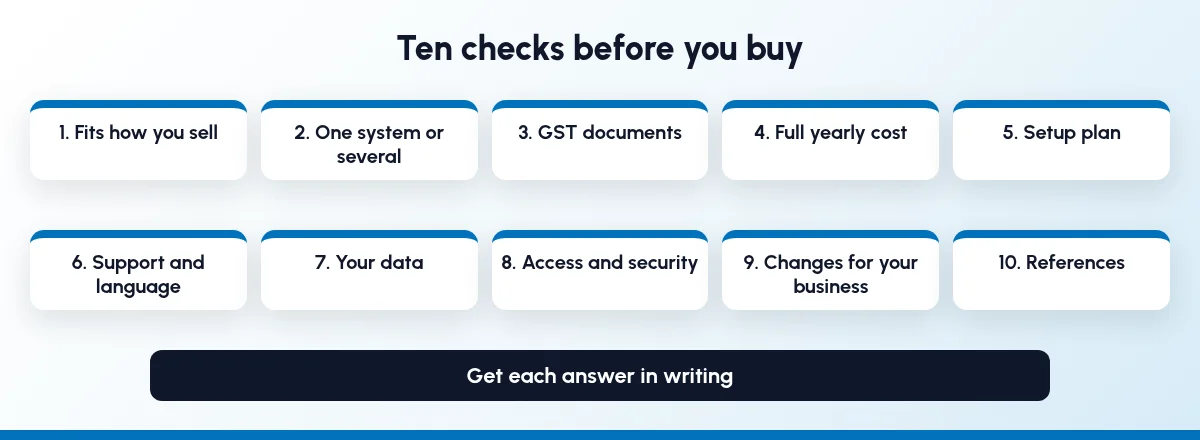
Use these ten checks for every vendor on your shortlist. They apply to ERP and CRM software in Ahmedabad or anywhere else.
#CheckAsk for in writing1Fits how you sellA demo of your own enquiry-to-invoice flow2One system or severalWhich modules are in the plan you are quoted3GST documentsSample invoice, e-invoice and e-way bill, if they apply to you4Full yearly costUsers × price, GST, implementation, support, hosting5Setup planSteps, timeline, who does data migration6SupportChannels, hours, language, what is included7Your dataHosting, backups, export, what happens if you leave8Access and securityRole-based access, certifications9Changes for your businessWhat is configuration, what is custom work, who pays10ReferencesTwo customers in your industry you can call or visit
1. Does it fit how you sell?
Many Gujarat SMEs sell through IndiaMART, TradeIndia or JustDial enquiries, dealer calls and WhatsApp. Ask the vendor to show an enquiry from your channels becoming a lead, a quotation, a sales order and a GST invoice, without retyping. Our guides to IndiaMART CRM integration and WhatsApp automation for B2B follow-ups show what that first step should look like.
2. Is it one system, or several joined together?
If sales can't see stock, they promise what isn't there. If accounts can't see orders, invoices get typed twice. Ask which of CRM, sales, inventory, purchase, production and accounts are in the plan you are quoted, and which cost extra. See ERP vs CRM for manufacturers and the signs you have outgrown a CRM-only tool.
3. Which GST documents does it produce?
Ask for a sample tax invoice from the system with your details. CBIC's invoice rules list the particulars a tax invoice must carry, including GSTINs and HSN codes. If e-invoicing or e-way bills apply to your business, ask to see the system generate them, and ask your CA to review the output before you decide.
4. What is the full yearly cost?
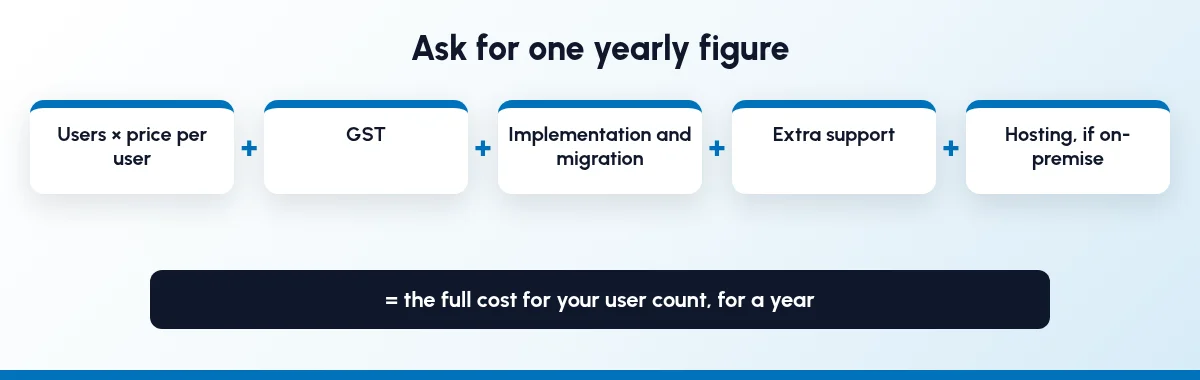
Per-user prices are easy to compare and easy to misread. Ask for one figure for your user count for a year, covering:
price per user and how many users you need (sales, stores, accounts, managers)
GST, and whether billing is monthly or yearly
implementation and data migration
support beyond what is included
hosting, if you want on-premise or a private server
5. Who sets it up, and by when?
Ask for the steps in writing: process study, configuration, data migration, training, go-live. Ask who moves your customer, item and opening stock data, and in what format. Ask for a timeline with dates. If you are moving off spreadsheets, our post on managing sales in Excel sheets covers what to clean first.
6. What does support cover, and in which language?
Ask how you raise an issue (phone, email, WhatsApp), the hours, how much support is included in the price, and what extra support costs. Ask whether someone can explain things to your staff in Gujarati or Hindi, and whether the team visits your site after go-live.
7. Who owns and hosts your data?
Ask where your data is hosted, how often it is backed up, and whether you can run the system on your own server instead. Ask how you export your customers, items and transactions, and in what format, if you ever leave.
8. How is access controlled?
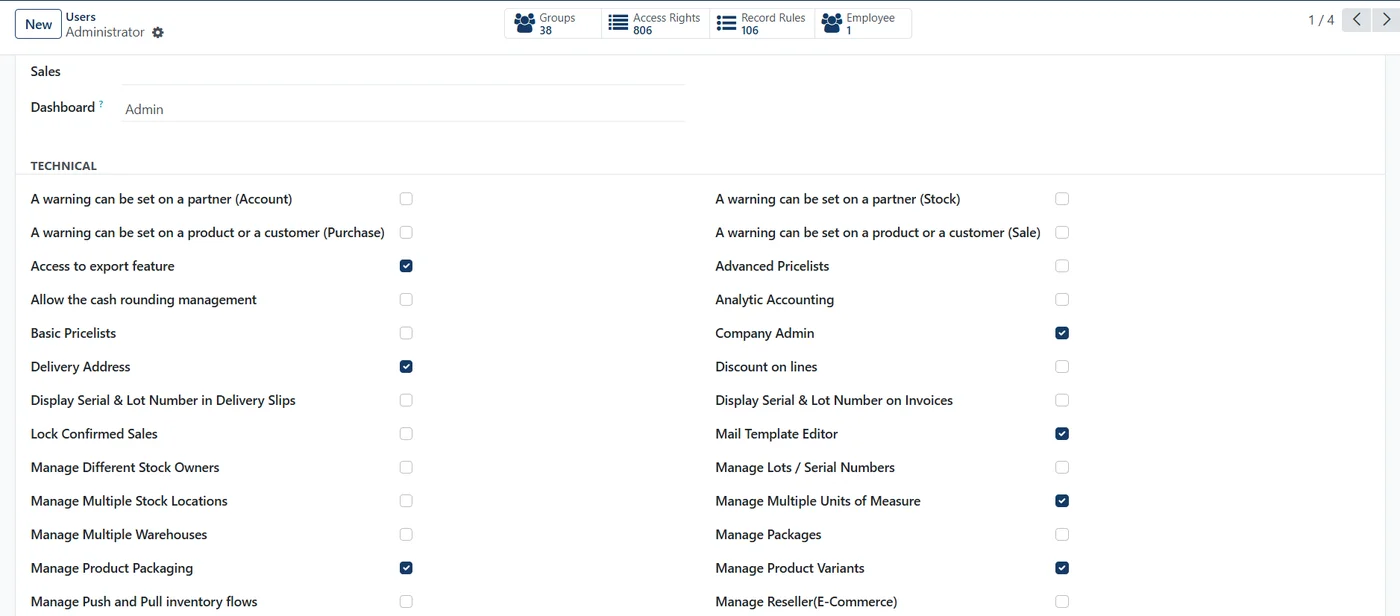
A salesperson should see their own leads, not the whole price list margin or the accounts. Ask the vendor to show role-based access for sales, stores and accounts. Ask which security or quality certifications the vendor holds, and for the certificate numbers. When a salesperson leaves, their leads and customers should stay with you; see how CRM and ERP keep sales data safe when staff leave.
9. What can be changed for your business?
Every business has a few habits the software must fit, such as a quotation format, a dealer scheme or a unit you sell in. Ask which of these are settings, which are custom work, who owns the custom work and what it costs.
10. Who can you call or visit?
Ask for two customers in your industry, ideally in Gujarat, and call them. Ask what went wrong during setup and how the vendor handled it. If you can, visit one and watch the system in daily use.
How do I run a demo that tells me something?
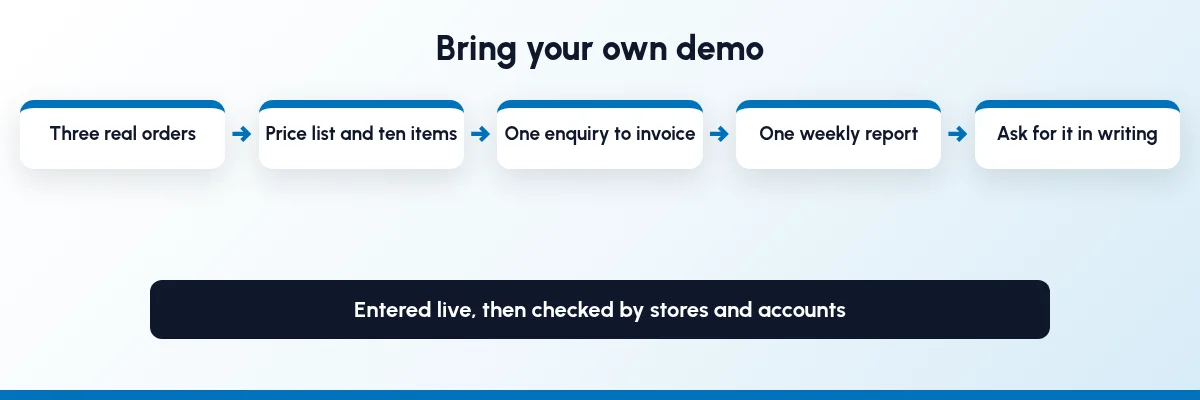
A standard demo follows the path the vendor knows well. Bring your own:
Three real orders from last month, including one that went wrong.
Your price list and ten items, with the units you actually sell in.
One portal or WhatsApp enquiry to follow from lead to invoice.
One report you check every week, such as dues by customer or orders by salesperson.
Ask the vendor to enter them live, then ask stores and accounts what they think. If the demo can't handle your three orders, a contract won't fix it. Our guide to inventory and sales integration lists the stock checks to include.
How does Sales Automation Suite answer this checklist?
Sales Automation Suite (SAS) from Peanut Square is one ERP and CRM built for how India sells. It is meant for India B2B sellers who outgrow a CRM-only stack and want one INR-priced ERP+CRM with India lead portals and WhatsApp on the pricing page, on Cloud or On-Premise. Peanut Square is based in Ahmedabad; the address on the SAS contact page is in Sarkhej, Ahmedabad.
Here is what the SAS site says on each check (all pages checked 19 Oct 2026):
#CheckWhat the SAS site says1Fits how you sellPricing lists IndiaMART, TradeIndia, JustDial, Meta forms and Free WhatsApp Automation, with Lead Import, Assignment, Follow-ups, Quotations, Proforma Invoices, Sales Orders and Billing.2One systemPricing lists CRM and sales, operations (Inventory, Multiple Stores, Purchase Orders, GRN, Production Jobs, MRP) and accounting (Balance Sheet, P&L, Trial Balance, Vouchers, Ledger Import, Sales Billing). It says both plans include the full feature set.3GST documentsNot covered on the pages we checked. Ask for a sample invoice.4Full yearly cost₹300/user/month on Premium (40% off ₹500, GST extra, billed yearly). Implementation is a one-time additional cost with custom pricing. Enterprise is custom priced and lists On Premise (one-time setup fee) and Custom Development.5Setup planThe home page describes a business process audit, configuration and migration of "legacy customer, catalog, and transaction records", a staging sandbox with role-based training, then go-live. Ask the SAS team for a written setup plan with dates for cloud and for on-premise, covering data migration, training and go-live.6SupportSupport channels and hours are not confirmed for this post. Ask the SAS team which support channels and hours your plan includes, what phone support covers, and get it in writing.7Your dataSAS runs on Cloud or On-Premise. The home FAQ says Cloud includes automatic updates and backups, and On-Premise is installed on your own servers. The about page says "Your company data belongs exclusively to you." Pricing lists Excel export.8Access and securityThe about page shows ISO 9001:2015 and ISO 27001:2022. SAS has a user access settings screen (screenshot below).9ChangesThe home FAQ says SAS can be configured for custom dealer commission models, manufacturing BOM workflows and custom invoice formats. Enterprise lists Custom Development as a one-time cost.10ReferencesAsk the SAS team for customers in your industry you can speak to. For Morbi tile businesses, see the SAS Morbi page; for factories, the SAS manufacturing page.
The SAS pages we checked don't cover GST e-invoices or e-way bills, support channels and hours, on-site visits after go-live, support in Gujarati, how long backups are kept, the export format for leaving, local customer references you can call, or whether access can limit a salesperson to their own leads. Ask the SAS team to show or confirm these when you book a demo.
On price: ₹300/user/month on Premium (40% off ₹500, GST extra, billed yearly). Implementation is a separate one-time cost. Source: SAS pricing, checked 19 Oct 2026.
What should a Gujarat SME check before buying CRM or ERP locally?
Check fit with how you sell, whether sales, stock and accounts are in one system, GST documents, the full yearly cost, the setup plan, support terms and language, data hosting and export, access control, what can be customised, and local references. Get each answer in writing.
Is a local ERP vendor better than a national one?
Not by itself. A local vendor makes visits, training and support in Gujarati easier. The software still has to fit your process, so run the same checks and the same demo with every vendor.
How long does ERP and CRM setup take for an SME?
It depends on modules, data and customisation, so don't rely on a general estimate. Ask each vendor, including SAS, for a written setup plan with dates for cloud and for on-premise, covering data migration, training and go-live.
What should I bring to an ERP demo?
Three real orders from last month, your price list with ten items, one portal or WhatsApp enquiry and one weekly report. Ask the vendor to enter them live.
Where is SAS based?
Peanut Square, the company behind SAS, is based in Ahmedabad. The SAS contact page lists its office in Sarkhej, Ahmedabad (checked 19 Oct 2026).