Short answer: Keep every dealer on one master record with their group, area, salesperson, price list and payment terms. Enter every dealer order as a sales order in the same system, whether it came by visit, phone or WhatsApp. Write each scheme down as a rule before you announce it: period, products, dealer groups, slabs and how the benefit is paid. Then count scheme progress from invoiced quantities, and settle claims against those records instead of the dealer's own sheet.
This guide to dealer order and scheme tracking covers why dealer orders and schemes slip, what one place for them should hold, how to set it up step by step, and what Sales Automation Suite documents today.
Why do dealer orders and schemes get out of hand?
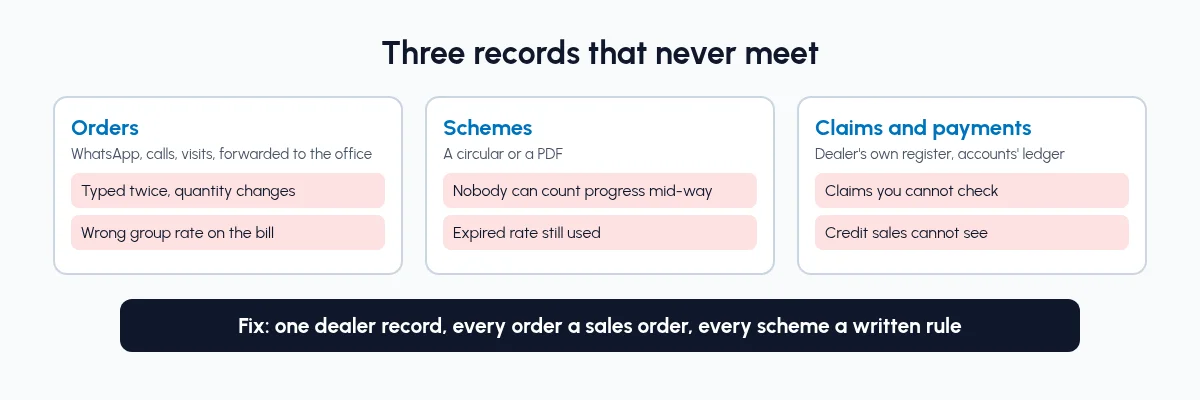
A manufacturer selling through dealers usually has three records that never meet. Orders come to the salesperson on WhatsApp, in a call or on a visit, and reach the factory as a forwarded message. Schemes go out as a circular or a PDF. Claims arrive at the end of the quarter, built from the dealer's own purchase register.
That is where the gaps open:
Orders typed twice. The salesperson notes the order, someone in the office retypes it, and the quantity or size changes on the way.
The wrong rate on the bill. A dealer in one group gets another group's price, or an expired scheme rate, because the rate came from memory.
Schemes nobody can count mid-way. Halfway through a quarter, neither the dealer nor the sales head knows how far the dealer is from the next slab.
Claims you cannot check. The dealer claims on what they bought. Your accounts team has to rebuild the same figures from invoices before agreeing.
Credit that sales cannot see. A salesperson books a large order for a dealer who is already well past their usual payment terms.
None of this is a dealer problem or a sales problem. Orders, prices, schemes and payments sit in different places.
What should a dealer order and scheme tracking system hold?
You do not need a separate tool for each job. You need these records joined up:
Dealer master. One record per dealer: group or type, area, assigned salesperson and manager, payment terms, price list, GSTIN and addresses.
Price lists. Rates by dealer group, with minimum quantities and the dates each rate is valid.
Scheme rules. Period, products, eligible dealers, slabs, the benefit and how it is paid, and the claim deadline.
Sales orders. Every dealer order, with the channel it came from and the person who took it.
Deliveries and invoices. What was actually dispatched and billed, which is what schemes should count.
Payments and outstanding. What each dealer owes and how old it is.
Claims and credit notes. What the dealer claimed, what your records support, and what was settled.
When these records are joined up, the questions a sales head asks every week ("what did this dealer order, how far are they from the slab, what do they owe?") can be answered from your own invoices and ledger, not the dealer's sheet.
How do manufacturers take dealer orders and track schemes in one place?
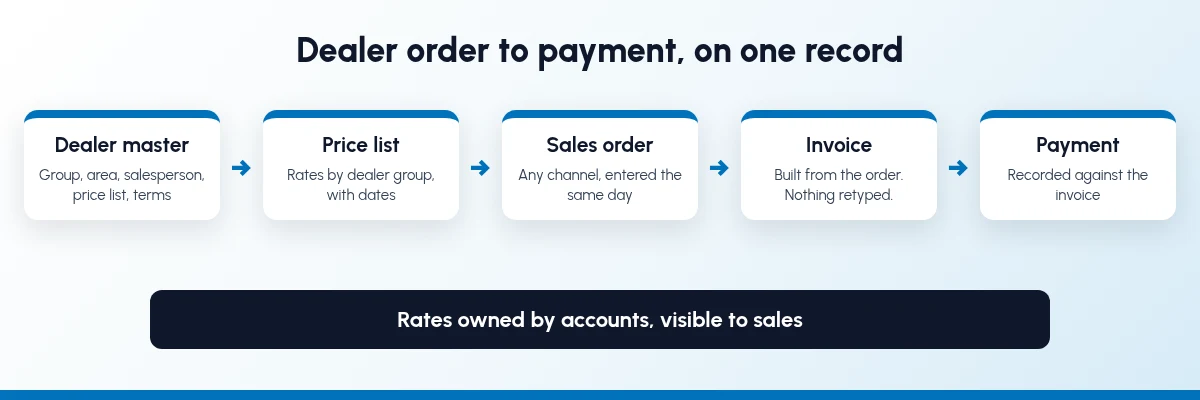
Set it up in this order. Each step is useful on its own.
Step 1: Build one dealer master
Put every dealer on one record. Include the group or dealer type (for example premium, standard or one-time), area and city, the assigned salesperson and their manager, payment terms, the price list and the GSTIN with billing and delivery addresses. Merge duplicates: a dealer split across two records has their scheme volume split too.
Step 2: Set price lists by dealer group
Many manufacturers price dealers by group, region or volume. Set those as price lists in the system, with the minimum quantity for each rate and the dates it applies. Link each dealer to their price list, so the right rate fills in when an order is entered.
Step 3: Write every scheme as a rule before you announce it
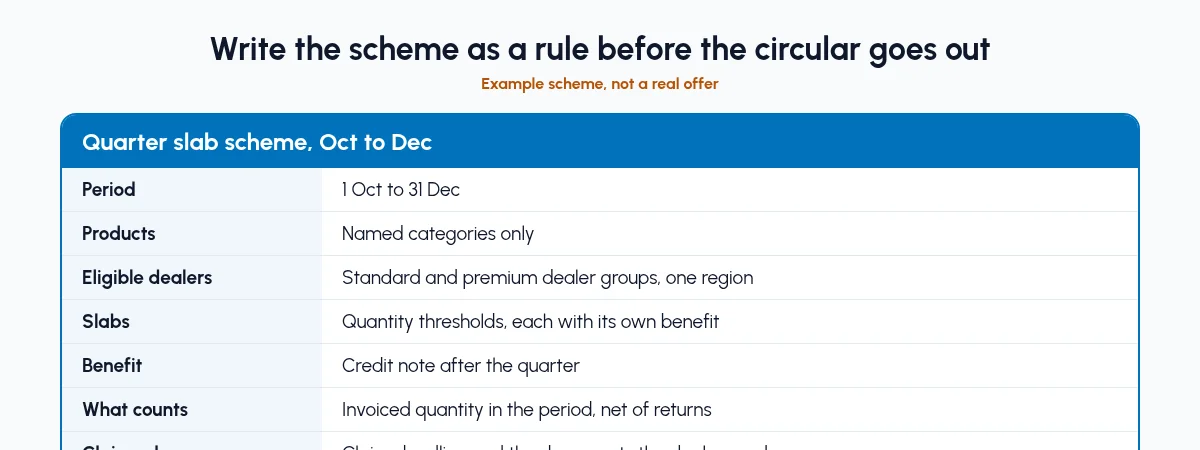
Before a scheme circular goes out, write it down in the same terms you will count it by:
Period: start and end dates.
Products: which items or categories count.
Eligible dealers: which groups, areas or named dealers.
Slabs: quantity or value thresholds, and what each earns.
Benefit: discount on the bill, free goods, or a credit after the period.
What counts: invoiced quantity, net of returns, inside the period.
Claim rules: the deadline and what the dealer has to send.
If a scheme cannot be written this way, it will be argued about at claim time. How a scheme discount or a later credit note is treated for GST is a question for your CA; settle that before the scheme starts.
Step 4: Enter every order as a sales order, whatever the channel
A visit order, a WhatsApp message and a phone call should all end up as a sales order against the dealer, entered by the salesperson or the order desk on the same day. The order picks up the dealer's price list and payment terms. Before confirming, check two things: stock for the items, and the dealer's current outstanding with accounts. Our post on WhatsApp follow-up for dealers and distributors covers taking dealer chats into the CRM.
Step 5: Dispatch and invoice against the order
The order becomes the delivery the godown packs and the invoice accounts raises. Nobody retypes it. This matters for schemes: progress should be counted from invoices, net of returns, not from orders that may still change. Our guide to inventory and sales integration covers the stock side of this step.
Step 6: Settle claims against your records
When a dealer sends a claim, compare it with invoiced quantities for that dealer, period and product list. Agree the difference line by line, then have accounts issue the credit note or payout and record it against the dealer's account. Keep the claim, your working and the settlement together.
Step 7: Review dealers every week
Run a short review, dealer by dealer, in the same order each week:
Orders this week against the same week last month.
Scheme progress and the gap to the next slab.
Outstanding, and how much of it is past the payment terms.
Open claims and their age.
Follow-ups due: visits, calls and collections.
The gap to the next slab is the most useful line. It gives the salesperson a reason to call the dealer before the period ends, not after.
What should sales see, and what should accounts own?
Dealer schemes go wrong when the person selling can also change the rules. Split it like this:
Sales and the dealer should see:
The dealer's price list and current schemes
Their own orders, deliveries and invoices
Scheme progress and the gap to the next slab
Outstanding and how old it is
Follow-ups and visits due
Accounts and the sales head should own:
Price lists, scheme rules and their dates
Invoices, credit notes and payment entries
What counts towards a scheme and claim approval
Payment terms and any credit limit
Dealer groups and who is eligible for what
Salespeople should be able to tell a dealer exactly where they stand. They should not be able to change the rate or the scheme to close an order.
What changes once dealer orders and schemes share one system?
We will not put a percentage on it, because it depends on how many dealers you have and how your schemes work today. These are the changes you can check yourself in the first month:
Every dealer order is a sales order on the dealer's record, with who took it and when.
Rates come from the dealer's price list, not from a salesperson's memory.
A price change is made once, on the price list, by the person who owns it.
When a salesperson leaves, their dealers' orders, chats and follow-ups stay in the system.
If your factory also plans production from dealer orders, the same records feed stock and manufacturing. We cover that in ERP vs CRM for manufacturers. See how SAS fits manufacturing businesses, tile manufacturers and traders, and businesses in Morbi.
What does Sales Automation Suite cover for dealer orders?
Sales Automation Suite (SAS) from Peanut Square is one ERP and CRM built for how India sells. It is meant for India B2B sellers who outgrow a CRM-only stack and want one INR-priced ERP+CRM with India lead portals and WhatsApp on the pricing page, on Cloud or On-Premise.
The SAS manufacturing industry page (checked 17 Oct 2026) describes SAS Dealers as "one master for dealers and customers with area, city, stage, salesperson assignment", and SAS Sales Order Double Approval, which requires two approvals before a sales order is final. The tile industry page adds SAS Geo Location, which shows dealer locations on a map. The SAS pricing page lists Quotations, Sales Orders, Billing, Customer Login and Visit Geo-Tag under CRM and Sales.
The SAS knowledge base (all checked 17 Oct 2026) describes the pieces this guide uses:
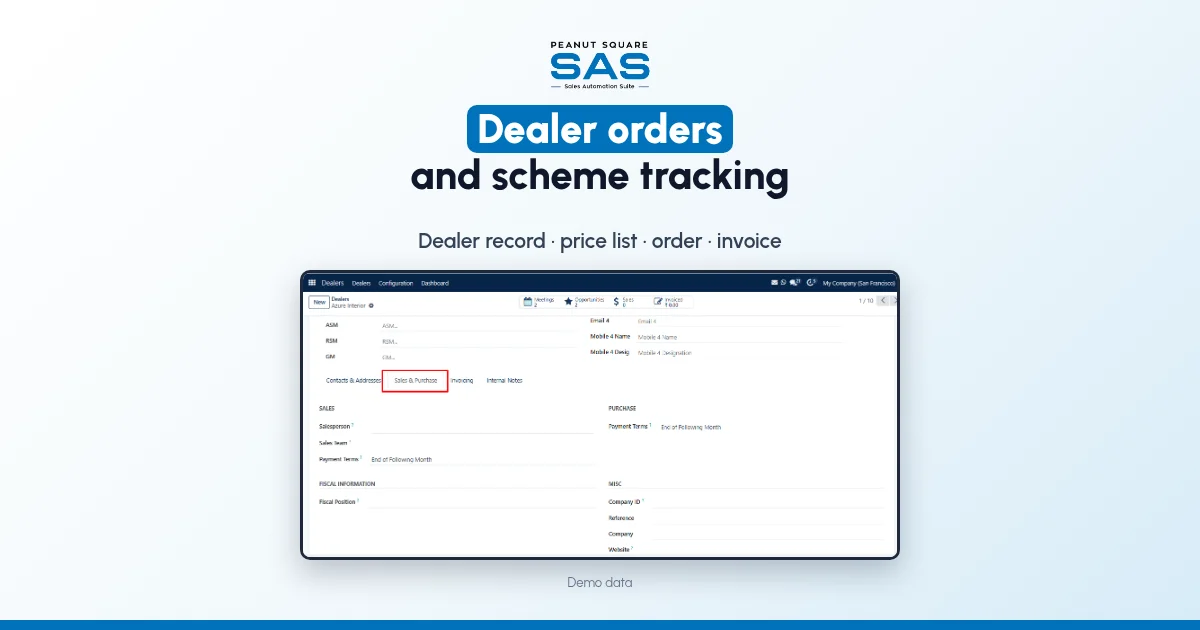
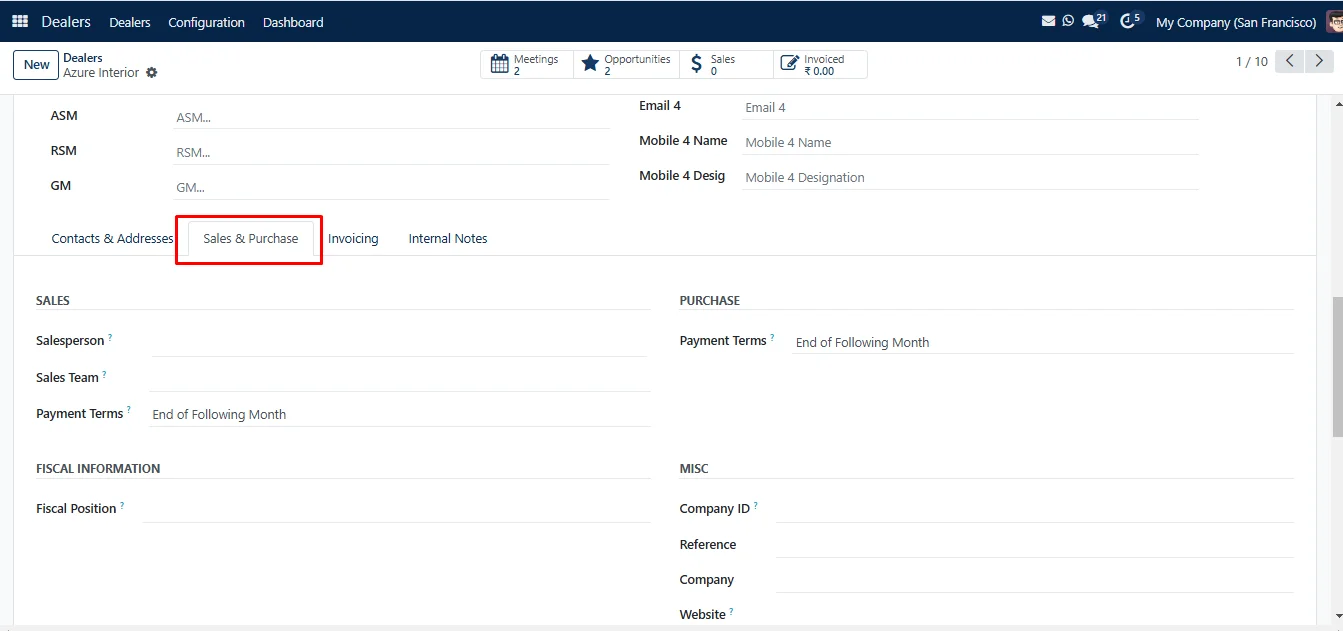
Dealer master. A dealer record holds group, area, stage (such as new enquiry, follow-up or factory visited), type of customer (premium dealer, standard dealer or one-time purchase), priority, salesperson, sales team, and the ASM, RSM and GM responsible.
Terms on the dealer. The Sales and Purchase tab on a dealer sets the salesperson, payment terms, price list, delivery method and fiscal position.
Follow-ups on the dealer. Activities can be scheduled on a dealer with a type, due date and the person assigned.
Price lists. Price rules can apply to all products, a category or one product, with a minimum quantity and a validity period, as a fixed price, a discount or a formula.
Promotions. The Discount and Loyalty feature supports programme types including promotions, discount codes, buy X get Y and loyalty cards, with conditional rules, and promotions can be applied on a quotation.
Order to invoice. A confirmed quotation becomes a sales order, and the invoice is created from the confirmed order. In the customer portal, a buyer can see their quotations, sales orders and delivery orders, and sign and pay a quotation online.
The knowledge base pages above do not cover target schemes, claim settlement, dealer credit limits or dealers placing orders themselves. If you run slab schemes or credit limits, ask the SAS team how they would be set up for your business before you rely on them.
The SAS home page describes WhatsApp order and dispatch alerts from the sales pipeline, and shows ISO 9001:2015 and ISO 27001:2022 certification.
How do manufacturers take dealer orders in one place?
Keep every dealer on one master record and enter every order as a sales order against that dealer, whatever channel it came from. The order picks up the dealer's price list and terms, and becomes the delivery and invoice without retyping.
How should we track dealer schemes?
Write each scheme as a rule with dates, products, eligible dealers, slabs and how the benefit is paid. Count progress from invoiced quantities net of returns, and review the gap to the next slab with each dealer during the period.
How do we check a dealer's scheme claim?
Compare the claim with the invoices for that dealer, period and product list in your system. Agree the difference line by line, then have accounts issue the credit note or payout against the dealer's account.
Should salespeople be able to change scheme rates?
No. Salespeople should see the dealer's price list, schemes and progress. Accounts or the sales head should own rates, scheme rules and claim approval.
Is a scheme discount on the invoice treated the same as a credit note later?
Not necessarily, and the GST treatment can differ. Ask your CA how each kind of scheme benefit should be documented before the scheme starts.