Short answer: Tile order management software tracks status well when every confirmed dealer order carries one of three statuses, ready, half-ready or not ready, plus a planning date. Ready means all of the order is in stock. Half-ready means part of it is. Not ready means none of it is yet. The factory updates it from stock, and the dealer reads the same status instead of calling. Review open orders by status and age every day.
Dealers in Pune, Mumbai and across Maharashtra often order from factories in Morbi, hundreds of kilometres away. A clear status saves both sides a phone call per order. Ready, half-ready and not ready describe an order, not stock; for the stock side see ceramic stock management for tile factories.
Why do dealers keep calling about order status?
Because the answer lives in one person's head. The dealer asks the salesperson, who asks the godown, who checks the racks. By the time the answer comes back, it may have changed.
What goes wrong:
No shared status. "Almost ready" means different things to different people.
No date. A not-ready order with no planning date sounds like a no.
Part stock is hidden. The dealer would take half now, but nobody offered.
Old orders get lost. Nobody looks at what has been open for 40 days.
What do ready, half-ready and not ready mean for a tile order?
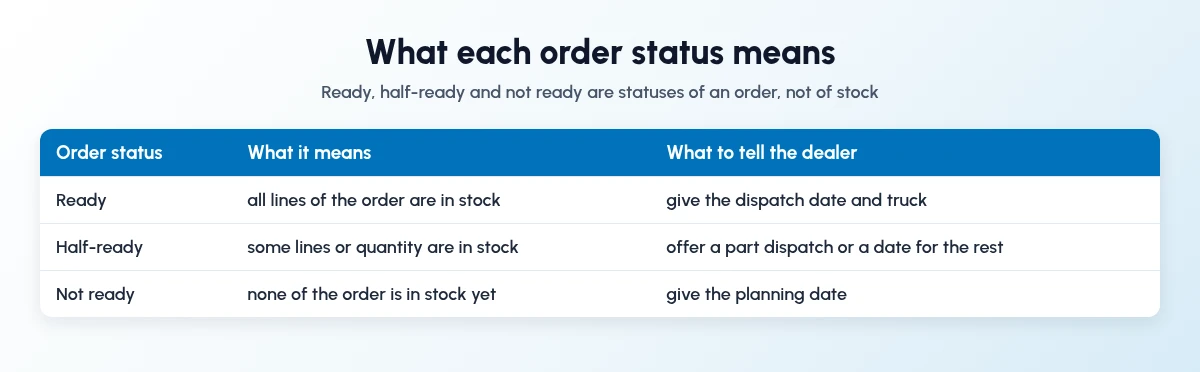
Agree on these in writing with your sales team and dealers. A status is only useful if everyone uses it the same way.
Ready: every line and quantity of the order is in stock, in the right batch and grade.
Half-ready: part of the order is in stock. Offer a part dispatch or a date for the rest.
Not ready: none of the order is in stock. Give a planning date.
How should tile order management software track status day to day?
Keep it to a short daily routine. Five steps:
Confirm the order with design, size, grade and quantity.
Book stock against it, so the status can be read from stock.
Set the status and a planning date for anything not ready.
Share the status with the dealer on the channel they use.
Review open orders by age each morning, oldest first.
Who should update the order status?
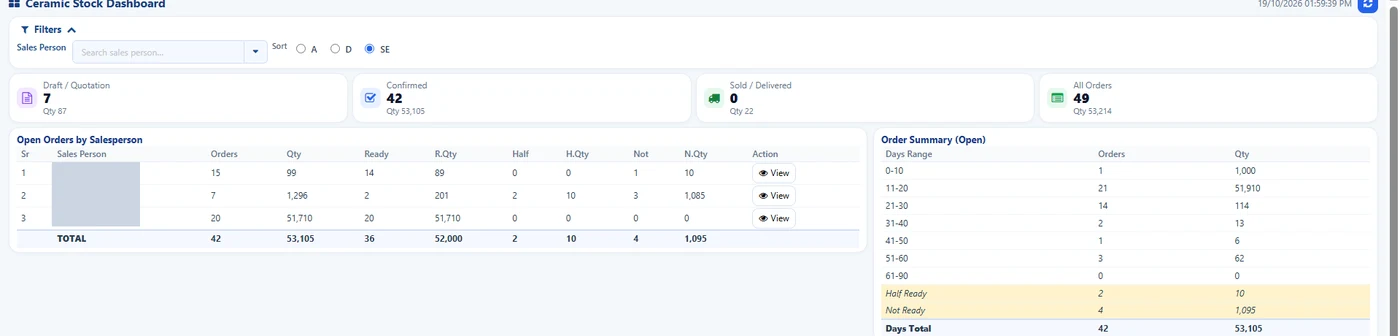
Ceramic Stock Dashboard: open orders by salesperson and status. Names hidden.
The factory, from stock. A salesperson should not mark an order ready from memory. The godown or planning team owns the status; sales tells the dealer.
Planning or godown: sets status and planning date from stock
Salesperson: tells the dealer, offers a part dispatch for half-ready orders
Sales head: reviews open orders by salesperson and age
Dealer: reads status, confirms a part dispatch or waits
How does Sales Automation Suite show tile order status?
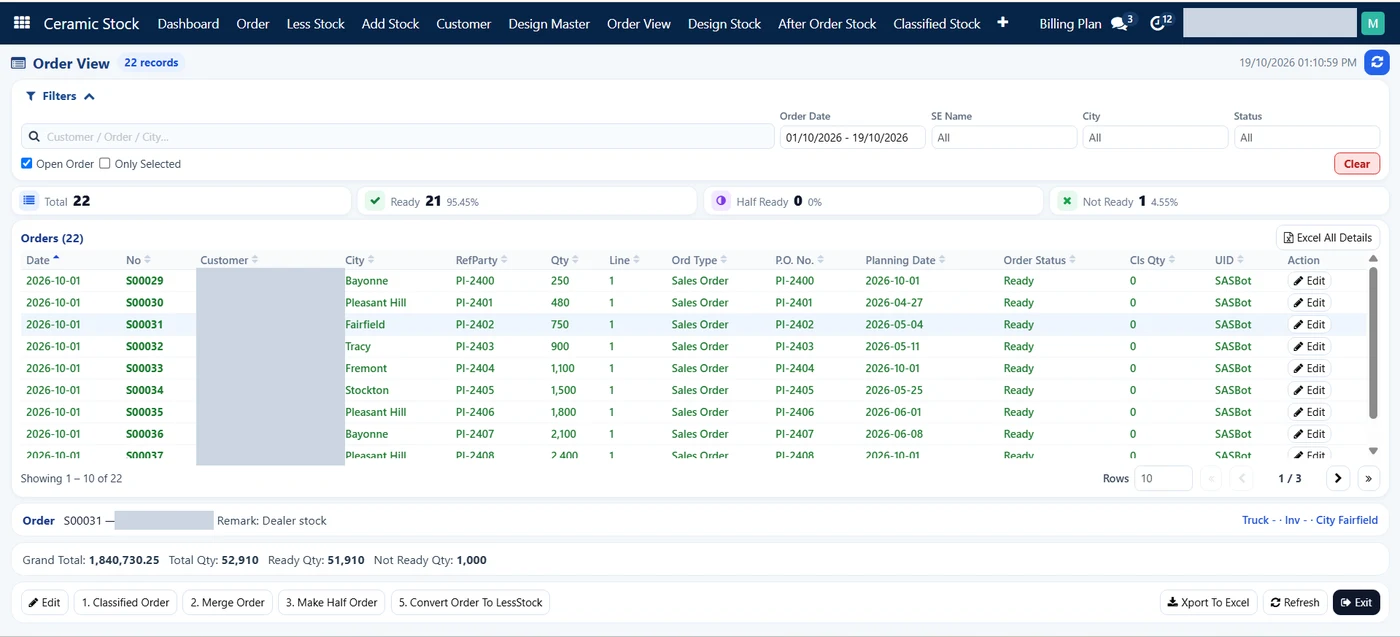
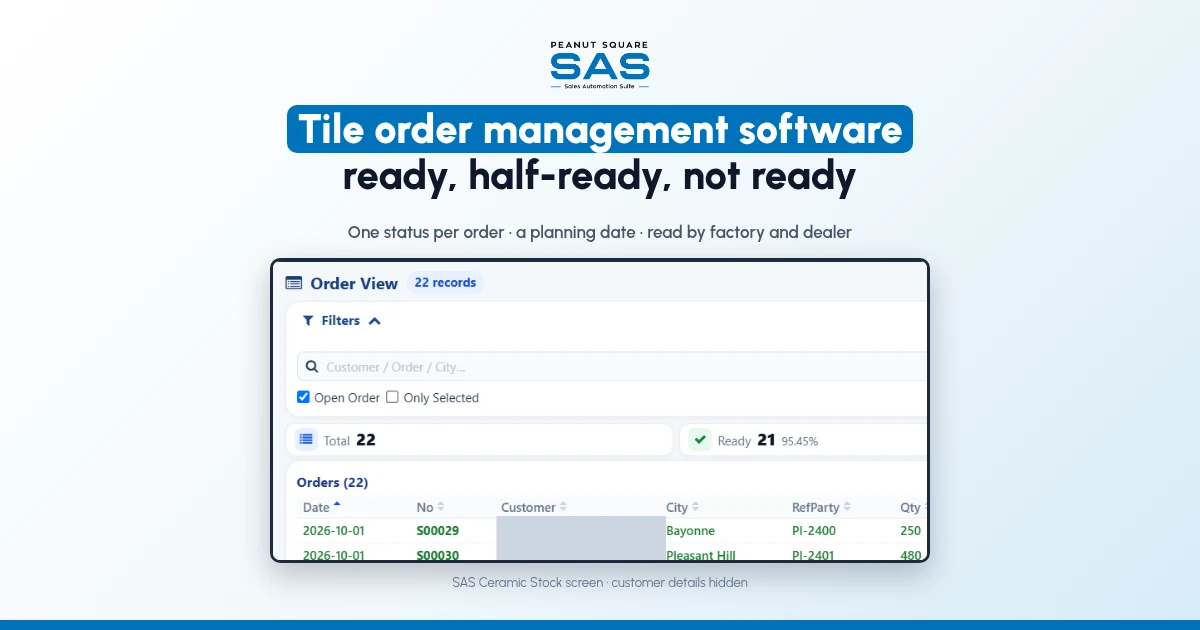
SAS Order View: open orders with city, planning date and status. Customer names hidden.
Sales Automation Suite (SAS) from Peanut Square is one ERP and CRM built for how India sells. It is meant for Indian B2B sellers who outgrow a CRM-only stack: India lead portals and WhatsApp are on the pricing page, the price is in rupees, and it runs on Cloud or On-Premise.
In the SAS Ceramic Stock screens shared by Nishant Patel on 19 Oct 2026 (customer details hidden):
The Order View shows counts of total, ready, half ready and not ready orders, and lists open orders with city, reference party, planning date and order status. Actions include Classified Order, Merge Order, Make Half Order and Convert Order To LessStock, and the list can be exported to Excel.
The Ceramic Stock Dashboard shows draft, confirmed and delivered orders, open orders by salesperson with ready, half and not-ready quantity, and an open order summary by days range.
The Orders list shows orders, quotations and confirmed orders, with a ready column.
The SAS tile industry page lists SAS Ceramic Stock Management and SAS Dealers, and the Morbi page describes checking design stock before an order is confirmed (both checked 19 Oct 2026). For how dealer orders and schemes are recorded, read dealer order and scheme tracking.
On price: ₹300/user/month on Premium (40% off ₹500, GST extra, billed yearly).
SAS is built by Peanut Square in Ahmedabad, Gujarat. The SAS tile industry page lists ISO 9001:2015 and ISO 27001:2022 (checked 19 Oct 2026). To see it with your own designs and dealers: Book a free demo at sas.peanutsquare.com.
How should a tile factory track and share order status with dealers?
Give every confirmed order one status, ready, half-ready or not ready, and a planning date. Set it from booked stock, share it with the dealer, and review open orders by age every day.
What does half-ready mean for a tile order?
Part of the order is in stock and part is not. The factory can offer the dealer a part dispatch now and a date for the rest.
Are ready, half-ready and not ready stock statuses?
No. They describe an order. Stock is tracked by design, batch, shade and grade; the order status says how much of an order that stock can fill.
How often should open tile orders be reviewed?
Daily, oldest first. An open order summary by days range shows which orders have waited longest.
Can SAS show order status by salesperson?
Yes. The SAS Ceramic Stock Dashboard shows open orders by salesperson with ready, half and not-ready quantity, in the screens shared on 19 Oct 2026.