Short answer: When choosing tile dealer software in Ahmedabad, check that it shows stock for each design by batch, shade and grade, counts cartons and loose pieces, tracks the orders you place with factories and the orders buyers place with you, records the LR number and transporter on each dispatch, and holds price lists and payment terms per buyer. Ask to see each of these on your own designs in the demo, and ask whether it runs on Cloud or On-Premise.
Ahmedabad dealers often buy from Morbi factories and sell to builders, contractors, architects and walk-in buyers across Gujarat. This checklist sits under our general ERP and CRM buyer's checklist for Ahmedabad, with the tile-specific questions added.
Why do tile dealers need different software from other traders?
A tile is not one item. The same design comes in sizes, finishes and grades, and two batches of it can differ in shade. A dealer who sells a 2,000-box project order needs it from one batch. General trading software counts "items" and misses this.
The other differences:
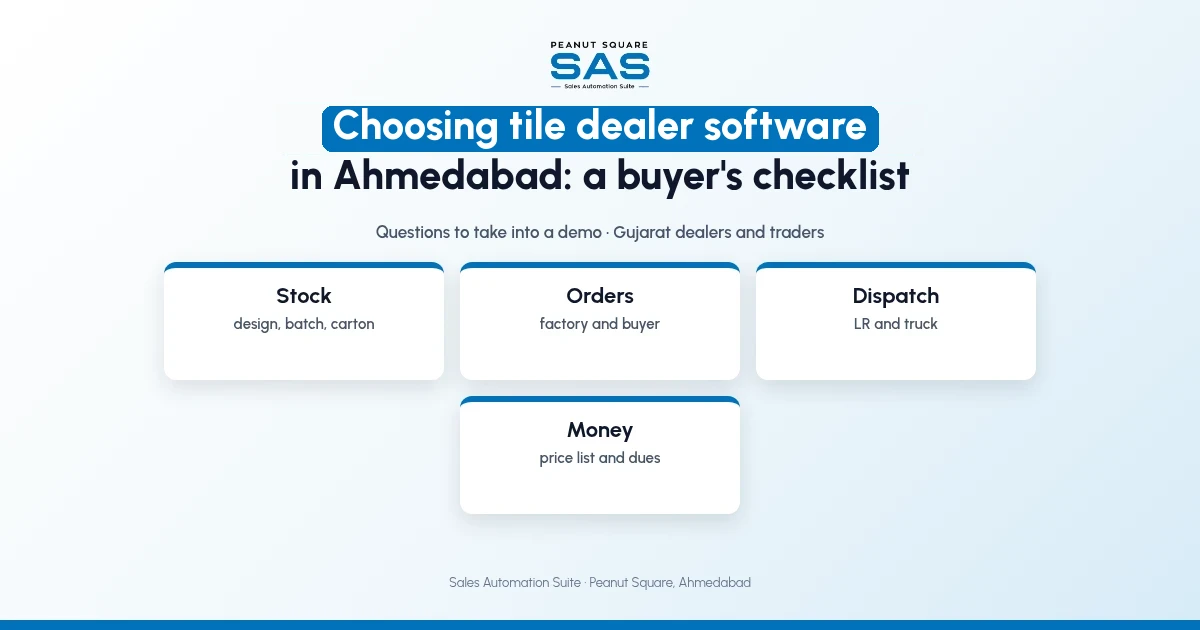
Stock is in cartons and pieces. Broken cartons and loose pieces are normal in a showroom.
Orders go two ways. You order from factories and take orders from buyers, often for the same design.
Dispatch comes by road. The buyer wants the truck and LR number, not "it has left".
Rates depend on the buyer. Builders, contractors and retail buyers pay different rates.
What should you check when choosing tile dealer software in Ahmedabad?
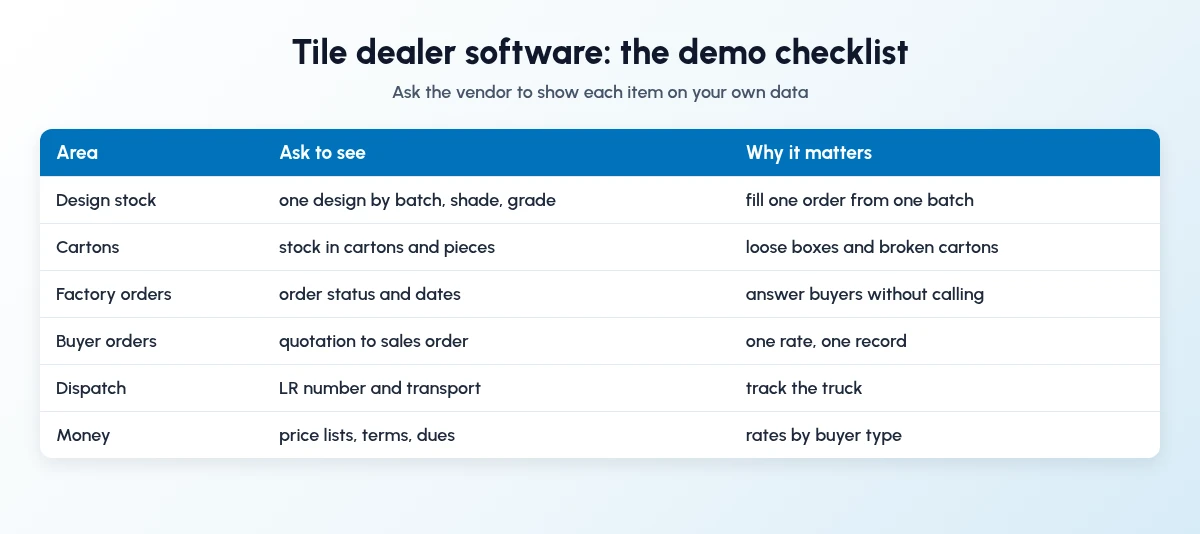
Take these questions into every demo. Ask the vendor to show the screen, not describe it.
Design master. Can one design hold size, finish, category and an image, and be marked discontinued?
Batch, shade and grade. Can I see one design split by batch or shade and grade?
Cartons. Can stock show cartons and loose pieces?
Booked stock. Does stock reduce when I confirm a buyer's order, before it ships?
Factory order status. Can I see whether my order with a factory is ready, half-ready or not ready?
Dispatch. Is the LR number and transporter saved on the delivery?
Price lists. Can I keep separate rates for builders, contractors and retail?
Payment terms and dues. Are terms saved per buyer, with dues I can follow up?
Leads and WhatsApp. Do portal enquiries and WhatsApp chats land in one place?
Deployment and price. Cloud or On-Premise, price per user, and the one-time implementation cost.
What should I ask about stock and orders?
Ask for a live example, not slides. Pick one of your fast designs and one slow one.
Show me current stock, stock after orders and stock after confirmed orders for this design.
Show me which buyer orders are booked against it.
Show me stock in cartons and pieces.
Export it to Excel so my accountant can check it.
This checklist only covers what to ask in a demo. For the deeper read on tracking design stock and ageing, see our tile dealer stock guide.
How does Sales Automation Suite fit a tile dealer in Ahmedabad?
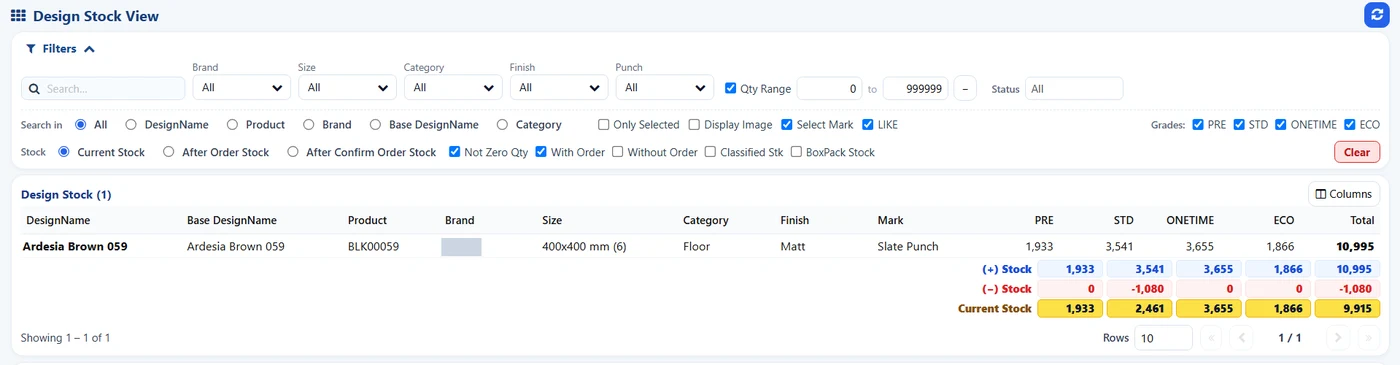
SAS Design Stock View: one design, stock by grade. Brand hidden.
Sales Automation Suite (SAS) from Peanut Square is one ERP and CRM built for how India sells. It is meant for Indian B2B sellers who outgrow a CRM-only stack: India lead portals and WhatsApp are on the pricing page, the price is in rupees, and it runs on Cloud or On-Premise. It is built in Ahmedabad by Peanut Square.
The SAS tile industry page (checked 19 Oct 2026) says traders and dealers use the same modules as manufacturers. It lists these modules against each need:
Stock by design: SAS Ceramic Stock Management
Cartons and pieces: Product Carton Management
Dealers and buyers by area, city, stage and salesperson: SAS Dealers
Dispatch: SAS Delivery LR Transport (LR number and transport name on delivery orders)
WhatsApp: SAS WhatsApp Index (inbox, templates, assignment)
Portal leads: SAS CRM Integration (IndiaMART, TradeIndia), JustDial and Facebook leads
In the SAS Ceramic Stock screens shared by Nishant Patel on 19 Oct 2026 (customer details hidden), the Design Stock View shows one design by grade, with current stock, stock after orders and stock after confirmed orders, and the orders booked against it. The SAS pricing page lists Quotations, Sales Orders, Billing, POS Print, Multiple Stores, Batches and Excel export (checked 19 Oct 2026). Knowledge base articles cover price lists.
On price: ₹300/user/month on Premium (40% off ₹500, GST extra, billed yearly).
SAS is built by Peanut Square in Ahmedabad, Gujarat. The SAS tile industry page lists ISO 9001:2015 and ISO 27001:2022 (checked 19 Oct 2026). To see it with your own designs and dealers: Book a free demo at sas.peanutsquare.com.
What should a tile dealer in Ahmedabad check before buying software?
Check that it keeps stock by design, batch, shade and grade, counts cartons and pieces, books stock against confirmed orders, tracks factory order status and LR dispatch, and holds price lists and payment terms per buyer. Ask to see each on your own data.
Can tile dealer software track stock in cartons and pieces?
It should. Ask the vendor to show a broken carton. The SAS tile page lists Product Carton Management, which tracks cartons and pieces (checked 19 Oct 2026).
Do tile dealers and tile manufacturers need different software?
Not always. Both need stock by design and batch, orders and dispatch. The SAS tile page says traders and dealers use the same modules as manufacturers (checked 19 Oct 2026).
Should a tile dealer choose Cloud or On-Premise software?
Cloud suits dealers who want staff to work from the showroom, godown and phone without a local server. On-Premise suits those who want data on their own server. SAS offers both; ask about the one-time setup fee for On-Premise.
What does SAS cost for a tile dealer?
₹300/user/month on Premium (40% off ₹500, GST extra, billed yearly), with a separate one-time implementation cost. Confirm with SAS which tile modules are included for your setup.