Short answer: A GST quotation should carry the same details your tax invoice will: your name, address and GSTIN, the buyer's details and GSTIN if registered, each item with its HSN or SAC code, quantity, unit, rate and taxable value, the GST rate and amount (CGST and SGST for a sale within your state, IGST for a sale to another state), plus validity and terms. Build it in your CRM from the product and customer records, then confirm the same record into a sales order and the GST invoice, so nothing is typed twice.
This guide covers what GST law actually prescribes, the fields to put on a quotation, how the tax split works, the common mistakes, and how to run quotation, sales order and invoice from one record in Sales Automation Suite.
What does GST law say about quotations?
Very little. GST rules prescribe what a tax invoice must contain, not what a quotation looks like.
The tax invoice is the GST document. CBIC's guide to tax invoices under GST says an invoice under GST means the tax invoice referred to in section 31 of the CGST Act, and that its particulars are set by rule 46 of the CGST Rules.
There is no fixed layout, only fixed fields. The same guide says no format is prescribed for an invoice, but certain fields are mandatory. CBIC lists them in its invoice rules.
Tax follows the supply, not the offer. The guide says GST is chargeable at the time of supply, and that the invoice is an important indicator of that time. Broadly, for goods that is the date the invoice is issued. A quotation is an offer made before any supply.
A proforma invoice is not the tax invoice. CBIC's guide lists the proforma invoice among the general types of invoice used in trade, separate from the tax invoice under section 31. Businesses use it to collect an advance or an approval. Note that the same guide puts the time of supply of services at the date of invoice or receipt of payment, whichever is earlier, so check how advances are taxed with your CA.
So why put GST on a quotation at all? The buyer compares landed cost, and the quotation is the record the order and invoice are built from. If it carries the right HSN, rate and tax type, the invoice comes out the same.
What should a GST quotation include?
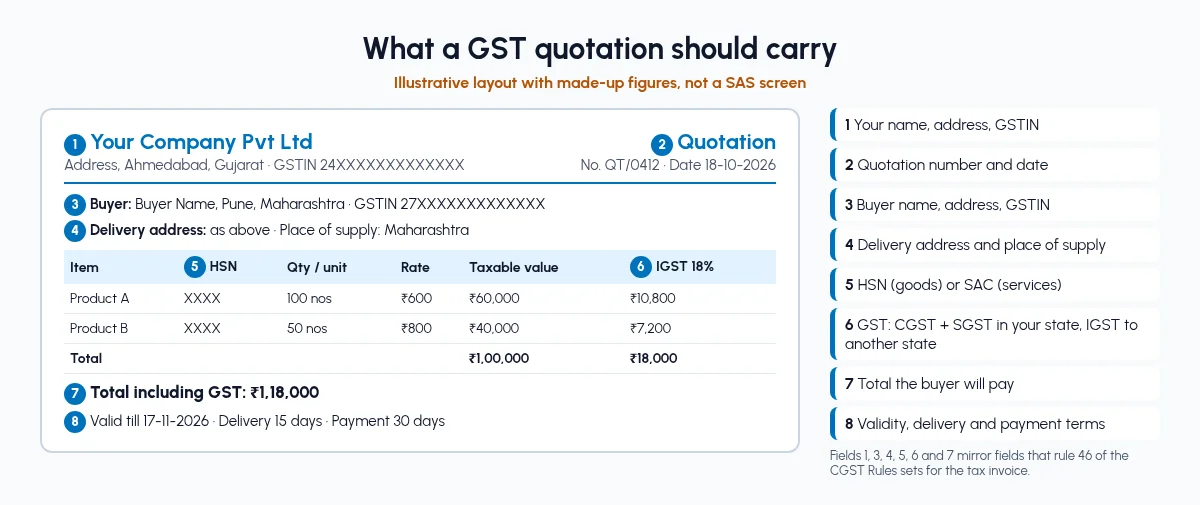
Mirror the tax invoice fields from rule 46, then add what a quotation needs and an invoice does not: validity, delivery and payment terms.
Your name, address and GSTIN. Rule 46 field on the invoice; the buyer checks it before raising a PO.
Quotation number and date. Lets you and the buyer refer to the same offer in follow-ups.
Buyer name, address and GSTIN, if registered. Rule 46 field; it also tells you which state the supply goes to.
Delivery address, if different. Rule 46 field; it can change the place of supply.
Item description, quantity and unit. The commercial offer, in the unit you will bill in.
HSN code for goods or SAC for services. Rule 46 field; decides the GST rate on the line.
Rate, discount and taxable value. Taxable value is after discount, as on the invoice.
GST rate and amount: CGST and SGST, or IGST. Rule 46 field; shows the buyer the tax they will pay.
Total including tax. The landed price the buyer compares.
Validity date. Stops an old rate from being held against you.
Delivery period and payment terms. Avoids disputes when the order is confirmed.
Rule 46 adds fields for some cases, such as unregistered buyers above a value limit and reverse charge supplies. The number of HSN digits you must show is set by notification under the same rule, so check your current requirement with your CA before fixing your template.
How do I show CGST, SGST and IGST on a quotation?
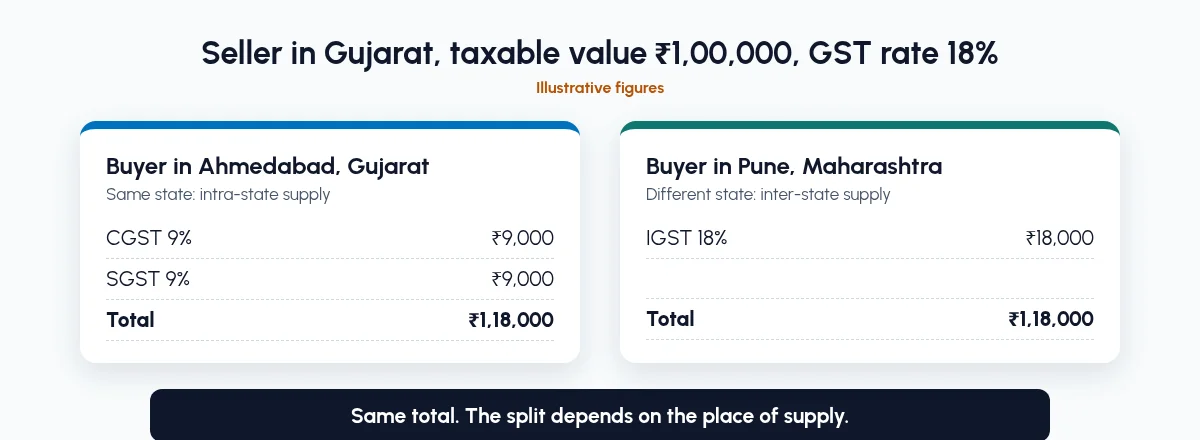
The tax type depends on where the supply goes. CBIC's IGST guide explains that whether you pay IGST or CGST plus SGST depends on whether the supply is inter-state or intra-state, and that this turns on the location of the supplier and the place of supply.
Same state: the supplier and the place of supply are in the same state. Show CGST and SGST, each at half the GST rate.
Different state: the supplier and the place of supply are in different states. Show IGST at the full rate.
Special cases: the same guide notes that supplies to or by an SEZ are treated as inter-state. If you sell to SEZ units or export, check the treatment with your CA.
Illustrative example (made-up figures): a seller in Gujarat quotes goods with a taxable value of ₹1,00,000, on an item whose GST rate is 18%.
Buyer in Ahmedabad, Gujarat: CGST 9% (₹9,000) plus SGST 9% (₹9,000). Total ₹1,18,000.
Buyer in Pune, Maharashtra: IGST 18% (₹18,000). Total ₹1,18,000.
The total is the same. The split changes, and it has to match the invoice you raise later. That is why the buyer's state and delivery address belong on the quotation.
What are the common mistakes in a GST quotation format?
HSN missing or copied wrong. A salesperson types the code from memory, and the invoice later shows a different code and rate.
Wrong tax type. The quote shows CGST and SGST for a buyer in another state, or the delivery address moves the place of supply and nobody updates the tax.
No validity date. A buyer comes back three months later and asks for the old rate.
Rates typed by hand. Two salespeople quote the same item at different prices to the same buyer.
A quotation that never becomes the order. Accounts retypes the confirmed quote into billing software, and quantities, rates or the GSTIN change on the way.
Most of these have one cause: the quotation lives in Excel or Word, and the order and invoice live somewhere else.
How do I go from a GST quotation to a sales order and invoice without retyping?
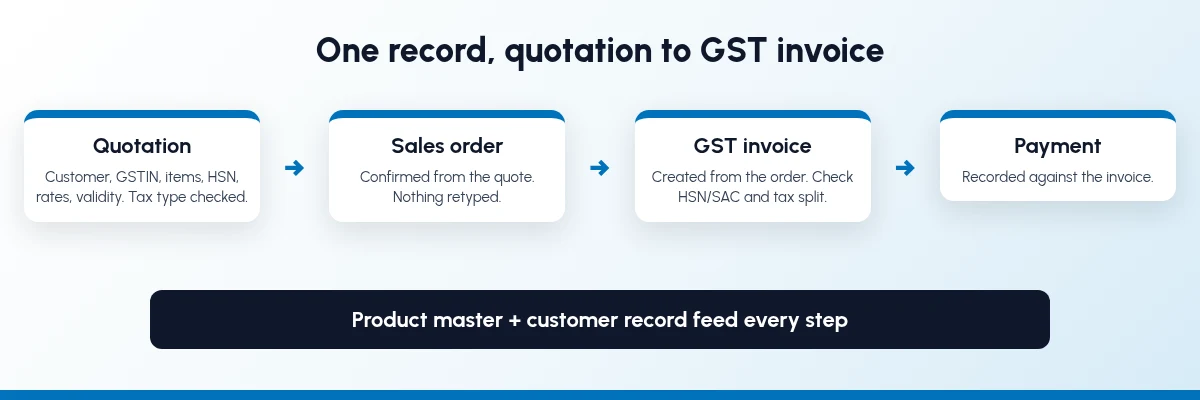
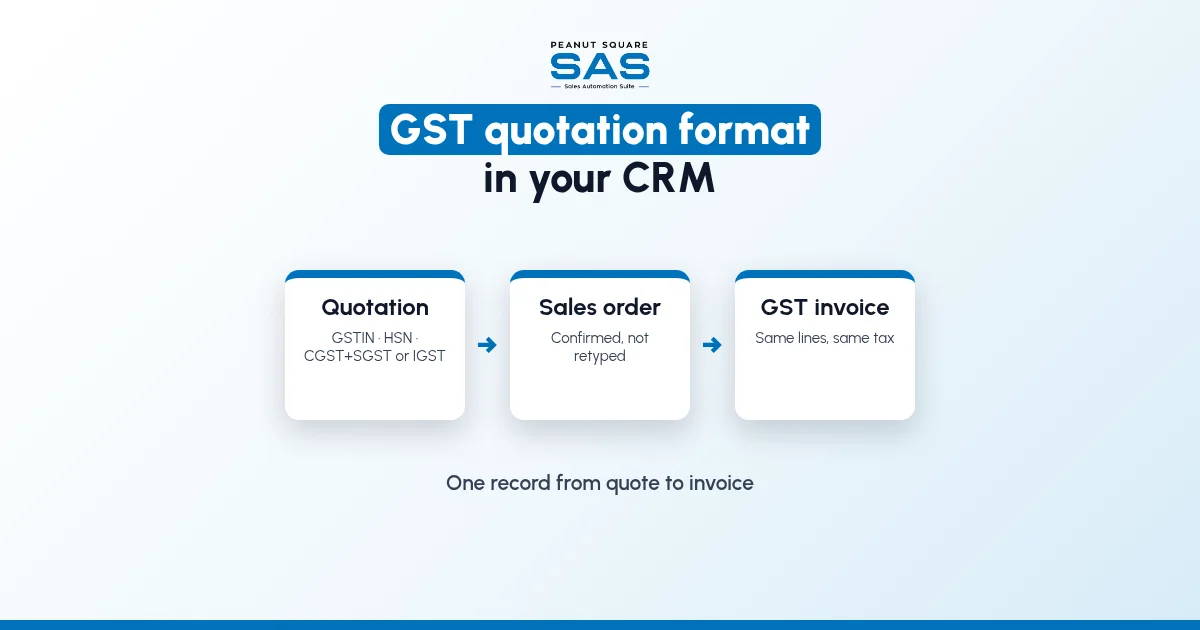
Keep one record from enquiry to invoice, and let each document be created from the one before it.
Step 1: Set up products and customers once
Give every product one code, one unit of measure, its HSN or SAC code and its GST rate. Give every customer their billing and delivery address, state and GSTIN, payment terms and price list. Every quotation will pull from these records, so get them right before anything else.
Step 2: Start the quotation from the enquiry
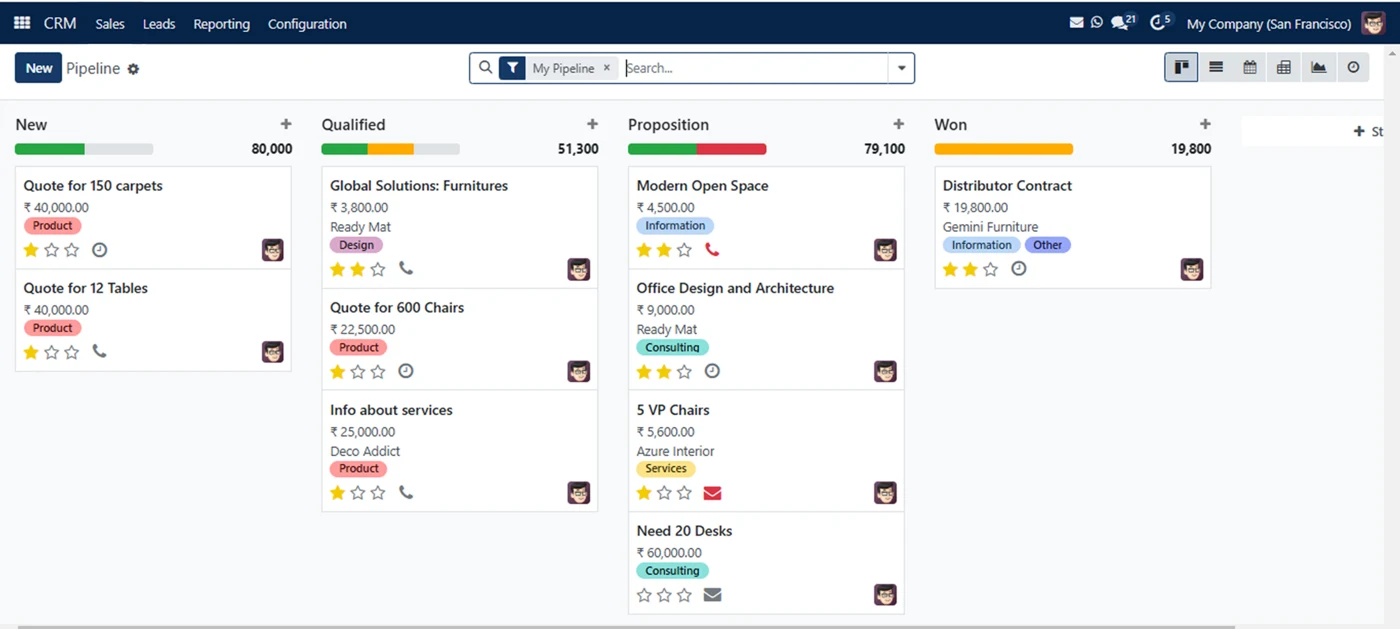
Leads from IndiaMART, TradeIndia, JustDial, Meta forms and WhatsApp should land in one pipeline with an owner; see IndiaMART CRM integration. When the buyer asks for a price, create the quotation from that opportunity, so the quote stays on the buyer's record with its follow-ups. Sales pipeline stages shows where quoting sits.
Step 3: Check the tax type on every quote
Pick the customer and the products. Addresses, price list and payment terms should come from the customer record, not from the salesperson's memory. The tax type depends on the place of supply: CGST and SGST when it is in your state, IGST when it is in another state. Check it on every quote, especially when the delivery address is in a different state from the billing address. Set a default validity and standard terms in a quotation template, so every quote goes out with them.
Step 4: Send it and track the reply
Send the quotation by email or WhatsApp, and schedule the follow-up on the same record. WhatsApp CRM automation covers follow-ups on WhatsApp. If your system has a customer portal, the buyer can review and accept the quotation there.
Step 5: Confirm the same record into a sales order
When the buyer agrees, confirm the quotation into a sales order. Customer, items, rates and taxes carry over. If you need an advance first, many businesses send a proforma invoice for it; ask your CA how the advance is taxed. If stock is involved, the order is also what stores pick and dispatch against; see inventory and sales integration.
Step 6: Raise the GST invoice from the order
Create the tax invoice from the confirmed order, then record payment against it. Rule 46 requires the invoice to carry the HSN or SAC code, so check that your invoice template prints it on each line, along with both GSTINs and the same rate and tax split the buyer saw on the quotation.
What should sales control, and what should accounts own?
Quotations are a sales job. Tax set-up is not. Split it like this:
Sales should control:
Which products and quantities go on the quote
Discount within the limits they are allowed
Validity, delivery period and follow-up date
Sending the quote and confirming the order
Accounts should own:
HSN or SAC code and GST rate on each product
Tax rules for same-state and other-state sales
Customer GSTIN and state on the customer record
Invoice numbering, invoice posting and payments
When salespeople can edit tax codes on a quote, the quote looks right and the invoice does not. Lock tax set-up to accounts and let sales pick from it.
What changes once quotation, order and GST invoice share one record?
We will not put a percentage on it, because it depends on how much retyping you do today. These are the changes you can check yourself within a few weeks:
Each quotation uses the same product lines the invoice will, so HSN, rate and tax type are checked once, before the quote goes out.
No one retypes a confirmed quote into billing software.
Quotes to buyers in another state are checked for IGST before they go out, not corrected on the invoice later.
Accounts can see which quotes became orders and which orders are not yet invoiced.
If your business also manufactures to order, the same record continues into stock and production. We cover that wider handoff in ERP vs CRM for manufacturers. See how SAS fits manufacturing businesses, and tile manufacturers and traders.
How does Sales Automation Suite handle GST quotations?
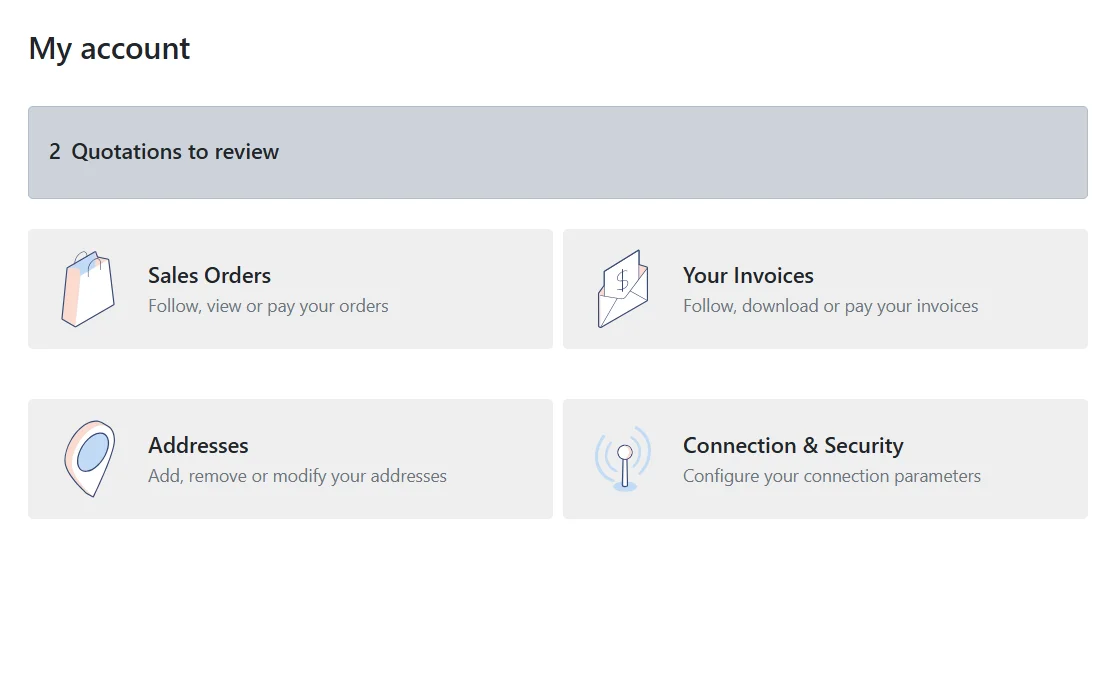
Sales Automation Suite (SAS) from Peanut Square is one ERP and CRM built for how India sells. It is meant for India B2B sellers who outgrow a CRM-only stack and want one INR-priced ERP+CRM with India lead portals and WhatsApp on the pricing page, on Cloud or On-Premise.
The SAS pricing page (checked 17 Oct 2026) lists Quotations, Sales Orders, Billing and Customer Login under CRM and Sales, and the home page describes WhatsApp integration that can "send instant quotations".
The SAS knowledge base (all checked 17 Oct 2026) describes the chain this guide uses:
Quote from the opportunity. A quotation can be started from an opportunity in the Proposition stage of the pipeline, and confirmed into a sales order from the same window.
Customer details fill in. Choosing a customer fills in the invoice address, delivery address, price list and payment terms. Expiry comes from a default validity, and quotation templates hold standard terms and header and footer files.
Tax on every line. Quotation lines show product, quantity, unit, unit price, taxes, discount and subtotal. Each product carries its customer taxes.
Buyer approval. The quotation can be sent by email, and the buyer can review it in the customer portal, sign and pay online, or reject it.
Order to invoice. Once the sales order is confirmed, the invoice is created from it, as a regular invoice or as a down payment by percentage or fixed amount, and payment is recorded against it.
The knowledge base does not say how GSTINs, HSN or SAC codes and the CGST, SGST or IGST split appear on printed quotations and invoices, or whether e-invoices and e-way bills are generated. Check these on a sample quotation and invoice with the SAS team and your CA before you go live.
The SAS home page shows ISO 9001:2015 and ISO 27001:2022 certification.
What should a GST quotation include?
Mirror the tax invoice fields in rule 46: your GSTIN, the buyer's details and GSTIN, HSN or SAC per item, quantity, rate, taxable value and GST. Add a validity date and terms.
Is GST charged on a quotation?
No tax is paid because you sent a quotation. CBIC's guide says GST is chargeable at the time of supply, and the tax invoice is the document for that supply. The quotation shows the GST the buyer should expect.
What is the difference between a quotation and a proforma invoice?
A quotation is your offer. A proforma invoice is a commercial document sent once terms are agreed, often to collect an advance. Neither is the tax invoice, which you raise for the supply under section 31 of the CGST Act.
When do I show IGST instead of CGST and SGST?
When the supplier's location and the place of supply are in different states, the supply is inter-state and IGST applies. Within the same state, show CGST and SGST. Check special cases, such as SEZ supplies, with your CA.
Can a CRM turn a GST quotation into an invoice?
Yes, if the CRM and billing are one system. In SAS, a confirmed quotation becomes a sales order, and the invoice is created from that order.